CWE-22
Weakness Allowed-with-ReviewImproper Limitation of a Pathname to a Restricted Directory
Abstraction: Base · Status: Stable
The product uses external input to construct a pathname that is intended to identify a file or directory that is located underneath a restricted parent directory, but the product does not properly neutralize special elements within the pathname that can cause the pathname to resolve to a location that is outside of the restricted directory.
Many file operations are intended to take place within a restricted directory. By using special elements such as ".." and "/" separators, attackers can escape outside of the restricted location to access files or directories that are elsewhere on the system. One of the most common special elements is the "../" sequence, which in most modern operating systems is interpreted as the parent directory of the current location. This is referred to as relative path traversal. Path traversal also covers the use of absolute pathnames such as "/usr/local/bin" to access unexpected files. This is referred to as absolute path traversal.
Mapping guidance
This CWE entry might have children that would be more appropriate.
Examine children of this entry to see if there is a better fit. Consider children such as CWE-23 (or its descendants) for relative path traversal, or CWE-36 for absolute path traversal.
Relationships and members
Modes of introduction
Detection methods
Automated Static Analysis
Automated techniques can find areas where path traversal weaknesses exist. However, tuning or customization may be required to remove or de-prioritize path-traversal problems that are only exploitable by the product's administrator - or other privileged users - and thus potentially valid behavior or, at worst, a bug instead of a vulnerability.
Effectiveness: High
Manual Static Analysis
Manual white box techniques may be able to provide sufficient code coverage and reduction of false positives if all file access operations can be assessed within limited time constraints.
Effectiveness: High
Automated Static Analysis - Binary or Bytecode
According to SOAR [REF-1479], the following detection techniques may be useful:
Highly cost effective:
Bytecode Weakness Analysis - including disassembler + source code weakness analysis
Cost effective for partial coverage:
Binary Weakness Analysis - including disassembler + source code weakness analysis
Effectiveness: High
Manual Static Analysis - Binary or Bytecode
According to SOAR [REF-1479], the following detection techniques may be useful:
Cost effective for partial coverage:
Binary / Bytecode disassembler - then use manual analysis for vulnerabilities & anomalies
Effectiveness: SOAR Partial
Dynamic Analysis with Automated Results Interpretation
According to SOAR [REF-1479], the following detection techniques may be useful:
Highly cost effective:
Web Application Scanner
Web Services Scanner
Database Scanners
Effectiveness: High
Dynamic Analysis with Manual Results Interpretation
According to SOAR [REF-1479], the following detection techniques may be useful:
Highly cost effective:
Fuzz Tester
Framework-based Fuzzer
Effectiveness: High
Manual Static Analysis - Source Code
According to SOAR [REF-1479], the following detection techniques may be useful:
Highly cost effective:
Manual Source Code Review (not inspections)
Cost effective for partial coverage:
Focused Manual Spotcheck - Focused manual analysis of source
Effectiveness: High
Automated Static Analysis - Source Code
According to SOAR [REF-1479], the following detection techniques may be useful:
Highly cost effective:
Source code Weakness Analyzer
Context-configured Source Code Weakness Analyzer
Effectiveness: High
Architecture or Design Review
According to SOAR [REF-1479], the following detection techniques may be useful:
Highly cost effective:
Formal Methods / Correct-By-Construction
Cost effective for partial coverage:
Inspection (IEEE 1028 standard) (can apply to requirements, design, source code, etc.)
Effectiveness: High
Notes
Other
In many programming languages, the injection of a null byte (the 0 or NUL) may allow an attacker to truncate a generated filename to apply to a wider range of files. For example, the product may add ".txt" to any pathname, thus limiting the attacker to text files, but a null injection may effectively remove this restriction.
Relationship
Pathname equivalence can be regarded as a type of canonicalization error.
Relationship
Some pathname equivalence issues are not directly related to directory traversal, rather are used to bypass security-relevant checks for whether a file/directory can be accessed by the attacker (e.g. a trailing "/" on a filename could bypass access rules that don't expect a trailing /, causing a server to provide the file when it normally would not).
Terminology
Like other weaknesses, terminology is often based on the types of manipulations used, instead of the underlying weaknesses. Some people use "directory traversal" only to refer to the injection of ".." and equivalent sequences whose specific meaning is to traverse directories.
Other variants like "absolute pathname" and "drive letter" have the *effect* of directory traversal, but some people may not call it such, since it doesn't involve ".." or equivalent.
Research Gap
Many variants of path traversal attacks are probably under-studied with respect to root cause. CWE-790 and CWE-182 begin to cover part of this gap.
Research Gap
Incomplete diagnosis or reporting of vulnerabilities can make it difficult to know which variant is affected. For example, a researcher might say that "..\" is vulnerable, but not test "../" which may also be vulnerable.
Any combination of directory separators ("/", "\", etc.) and numbers of "." (e.g. "....") can produce unique variants; for example, the "//../" variant is not listed (CVE-2004-0325). See this entry's children and lower-level descendants.
Content history
Identified weakness in Perl demonstrative example
Provided diagram to improve CWE usability
Identified weakness in "good code" for Python demonstrative example
Provided a demonstrative example in PHP
updated Potential_Mitigations, Time_of_Introduction
Suggested OWASP Top Ten 2004 mapping
updated Alternate_Terms, Relationships, Other_Notes, Relationship_Notes, Relevant_Properties, Taxonomy_Mappings, Weakness_Ordinalities
updated Description
updated Relationships, Taxonomy_Mappings
updated Potential_Mitigations
updated Alternate_Terms, Applicable_Platforms, Common_Consequences, Demonstrative_Examples, Description, Detection_Factors, Likelihood_of_Exploit, Name, Observed_Examples, Other_Notes, Potential_Mitigations, References, Related_Attack_Patterns, Relationship_Notes, Relationships, Research_Gaps, Taxonomy_Mappings, Terminology_Notes, Time_of_Introduction, Weakness_Ordinalities
updated Common_Consequences, Demonstrative_Examples, Description, Detection_Factors, Potential_Mitigations, References, Relationships
updated Potential_Mitigations
updated Potential_Mitigations
updated Potential_Mitigations
updated Relationships
updated Potential_Mitigations, References, Relationships, Taxonomy_Mappings
updated Demonstrative_Examples, References, Relationships
updated Potential_Mitigations
updated Observed_Examples
updated Related_Attack_Patterns, Relationships
updated Other_Notes, Research_Gaps
updated Detection_Factors, Relationships, Taxonomy_Mappings
updated Relationships
updated Related_Attack_Patterns
updated Demonstrative_Examples
updated Affected_Resources, Causal_Nature, Likelihood_of_Exploit, References, Relationships, Relevant_Properties, Taxonomy_Mappings
updated References, Relationships
updated References, Related_Attack_Patterns, Relationships, Taxonomy_Mappings
updated Related_Attack_Patterns, Relationships, Type
updated Relationships
updated Potential_Mitigations, Relationships
updated Demonstrative_Examples, Potential_Mitigations
updated Relationships
updated Potential_Mitigations, Relationships
updated Demonstrative_Examples, Relationships
updated Relationships
updated Observed_Examples, Relationships
updated Observed_Examples, Relationships
updated Observed_Examples, References
updated Common_Consequences, Description, Detection_Factors
updated Demonstrative_Examples, References, Relationships, Time_of_Introduction
updated Mapping_Notes, Relationships
updated Observed_Examples
updated Common_Consequences, Description, Diagram, Observed_Examples, Other_Notes, References
updated Demonstrative_Examples, Relationships
updated Relationships
updated Applicable_Platforms, Detection_Factors, Observed_Examples, Potential_Mitigations, References
updated Mapping_Notes, Relationships
updated Alternate_Terms, Applicable_Platforms, Demonstrative_Examples, Relationships
updated Applicable_Platforms, Common_Consequences, Name, References, Relationships, Taxonomy_Mappings
16058 vulnerabilities reference this CWE, most recent first.
GHSA-JRH2-HC4R-7JWX
Vulnerability from github – Published: 2022-01-12 19:21 – Updated: 2024-09-20 12:19Storage.save in Django 2.2 before 2.2.26, 3.2 before 3.2.11, and 4.0 before 4.0.1 allows directory traversal if crafted filenames are directly passed to it.
{
  "affected": [
    {
      "package": {
        "ecosystem": "PyPI",
        "name": "Django"
      },
      "ranges": [
        {
          "events": [
            {
              "introduced": "2.2"
            },
            {
              "fixed": "2.2.26"
            }
          ],
          "type": "ECOSYSTEM"
        }
      ]
    },
    {
      "package": {
        "ecosystem": "PyPI",
        "name": "Django"
      },
      "ranges": [
        {
          "events": [
            {
              "introduced": "3.2"
            },
            {
              "fixed": "3.2.11"
            }
          ],
          "type": "ECOSYSTEM"
        }
      ]
    },
    {
      "package": {
        "ecosystem": "PyPI",
        "name": "Django"
      },
      "ranges": [
        {
          "events": [
            {
              "introduced": "4.0"
            },
            {
              "fixed": "4.0.1"
            }
          ],
          "type": "ECOSYSTEM"
        }
      ]
    }
  ],
  "aliases": [
    "CVE-2021-45452"
  ],
  "database_specific": {
    "cwe_ids": [
      "CWE-22"
    ],
    "github_reviewed": true,
    "github_reviewed_at": "2022-01-12T19:17:35Z",
    "nvd_published_at": "2022-01-05T00:15:00Z",
    "severity": "MODERATE"
  },
  "details": "Storage.save in Django 2.2 before 2.2.26, 3.2 before 3.2.11, and 4.0 before 4.0.1 allows directory traversal if crafted filenames are directly passed to it.",
  "id": "GHSA-jrh2-hc4r-7jwx",
  "modified": "2024-09-20T12:19:34Z",
  "published": "2022-01-12T19:21:04Z",
  "references": [
    {
      "type": "ADVISORY",
      "url": "https://nvd.nist.gov/vuln/detail/CVE-2021-45452"
    },
    {
      "type": "WEB",
      "url": "https://github.com/django/django/commit/4cb35b384ceef52123fc66411a73c36a706825e1"
    },
    {
      "type": "WEB",
      "url": "https://github.com/django/django/commit/8d2f7cff76200cbd2337b2cf1707e383eb1fb54b"
    },
    {
      "type": "WEB",
      "url": "https://github.com/django/django/commit/e1592e0f26302e79856cc7f2218ae848ae19b0f6"
    },
    {
      "type": "WEB",
      "url": "https://docs.djangoproject.com/en/4.0/releases/security"
    },
    {
      "type": "ADVISORY",
      "url": "https://github.com/advisories/GHSA-jrh2-hc4r-7jwx"
    },
    {
      "type": "PACKAGE",
      "url": "https://github.com/django/django"
    },
    {
      "type": "WEB",
      "url": "https://github.com/pypa/advisory-database/tree/main/vulns/django/PYSEC-2022-3.yaml"
    },
    {
      "type": "WEB",
      "url": "https://groups.google.com/forum/#!forum/django-announce"
    },
    {
      "type": "WEB",
      "url": "https://lists.fedoraproject.org/archives/list/package-announce@lists.fedoraproject.org/message/B4SQG2EAF4WCI2SLRL6XRDJ3RPK3ZRDV"
    },
    {
      "type": "WEB",
      "url": "https://security.netapp.com/advisory/ntap-20220121-0005"
    },
    {
      "type": "WEB",
      "url": "https://www.djangoproject.com/weblog/2022/jan/04/security-releases"
    }
  ],
  "schema_version": "1.4.0",
  "severity": [
    {
      "score": "CVSS:3.1/AV:N/AC:L/PR:N/UI:N/S:U/C:L/I:N/A:N",
      "type": "CVSS_V3"
    },
    {
      "score": "CVSS:4.0/AV:N/AC:L/AT:N/PR:N/UI:N/VC:L/VI:N/VA:N/SC:N/SI:N/SA:N",
      "type": "CVSS_V4"
    }
  ],
  "summary": "Directory-traversal in Django"
}
GHSA-JRH5-VHR9-QH7Q
Vulnerability from github – Published: 2024-11-13 14:12 – Updated: 2024-11-13 18:58Summary
A vulnerability in CraftCMS allows an attacker to bypass local file system validation by utilizing a double file:// scheme (e.g., file://file:////). This enables the attacker to specify sensitive folders as the file system, leading to potential file overwriting through malicious uploads, unauthorized access to sensitive files, and, under certain conditions, remote code execution (RCE) via Server-Side Template Injection (SSTI) payloads.
Note that this will only work if you have an authenticated administrator account with allowAdminChanges enabled.
https://craftcms.com/knowledge-base/securing-craft#set-allowAdminChanges-to-false-in-production
Details
The issue lies in line 57 of cms/src/helpers/FileHelper.php, it only removes file:// on the most left. It is trivial to bypass this sanitization by adding 2 file://, e.g. file://file:////.
    public static function normalizePath($path, $ds = DIRECTORY_SEPARATOR): string
    {
        // Remove any file protocol wrappers
        $path = StringHelper::removeLeft($path, 'file://');

        // Is this a UNC network share path?
        $isUnc = (str_starts_with($path, '//') || str_starts_with($path, '\\\\'));

        // Normalize the path
        $path = parent::normalizePath($path, $ds);

        // If it is UNC, add those slashes back in front
        if ($isUnc) {
            $path = $ds . $ds . ltrim($path, $ds);
        }

        return $path;
    }
PoC
- Sign in with an admin account and navigate to
Settings → Assets, then create a new volume. - n the Asset Filesystem section, create a new file system and set the Base Path to
file://file:////vendor. Without the prefix, the selection fails.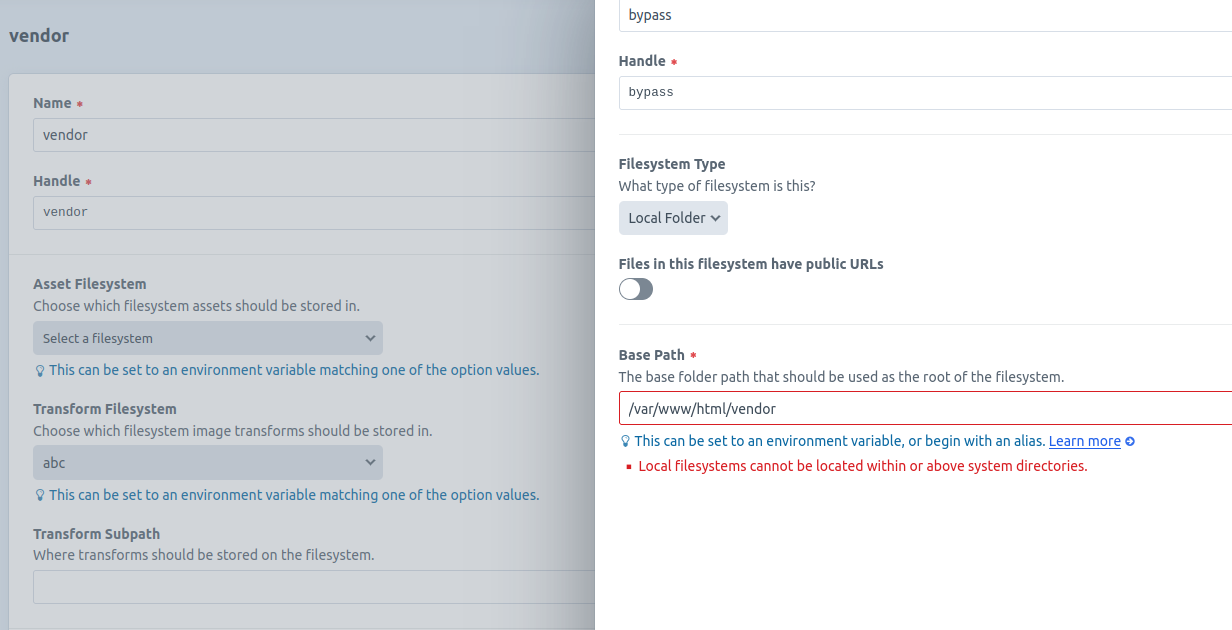 With the double
file://prefix, the selection succeeds.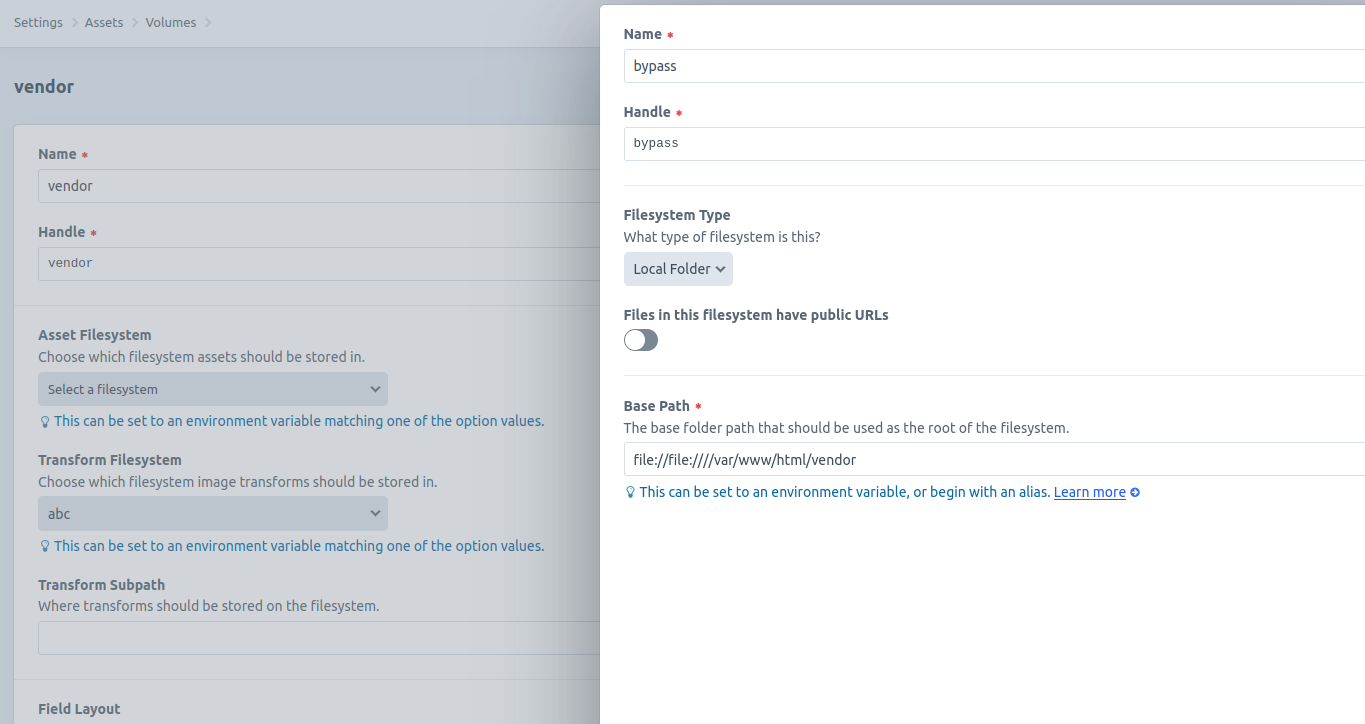
- Access Assets from the left navigation bar, then upload a file into this volume.
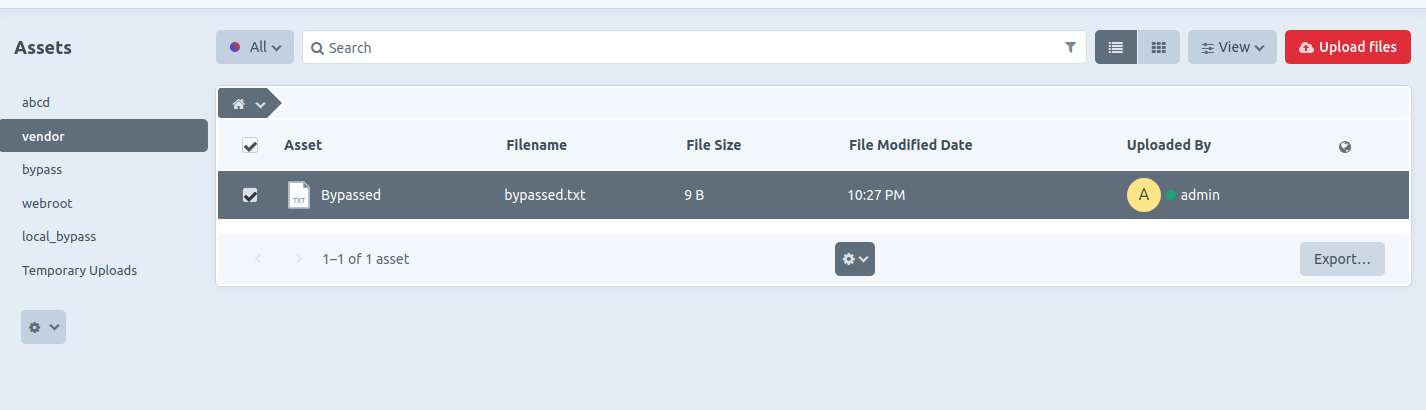
- The file is successfully uploaded and stored in the sensitive folder specified (e.g.,
/vendor).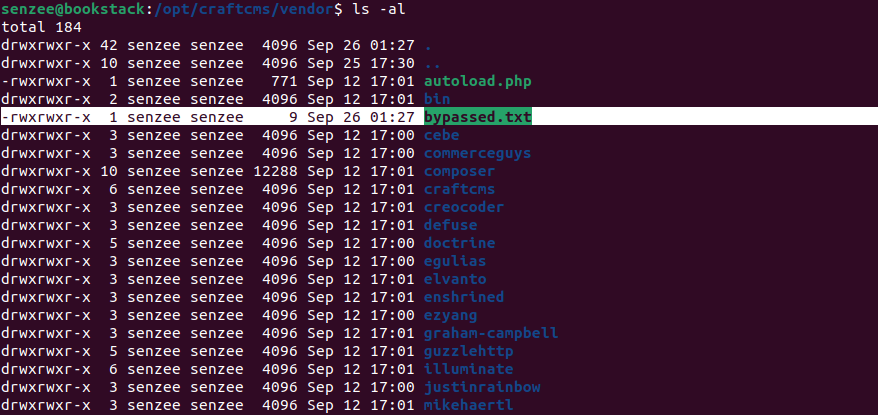
- SSTI payloads can be uploaded to
/templatesfolder, though full code execution was not achieved during testing, some payloads were still successful, leading to sensitive information disclosure, among other potential impacts.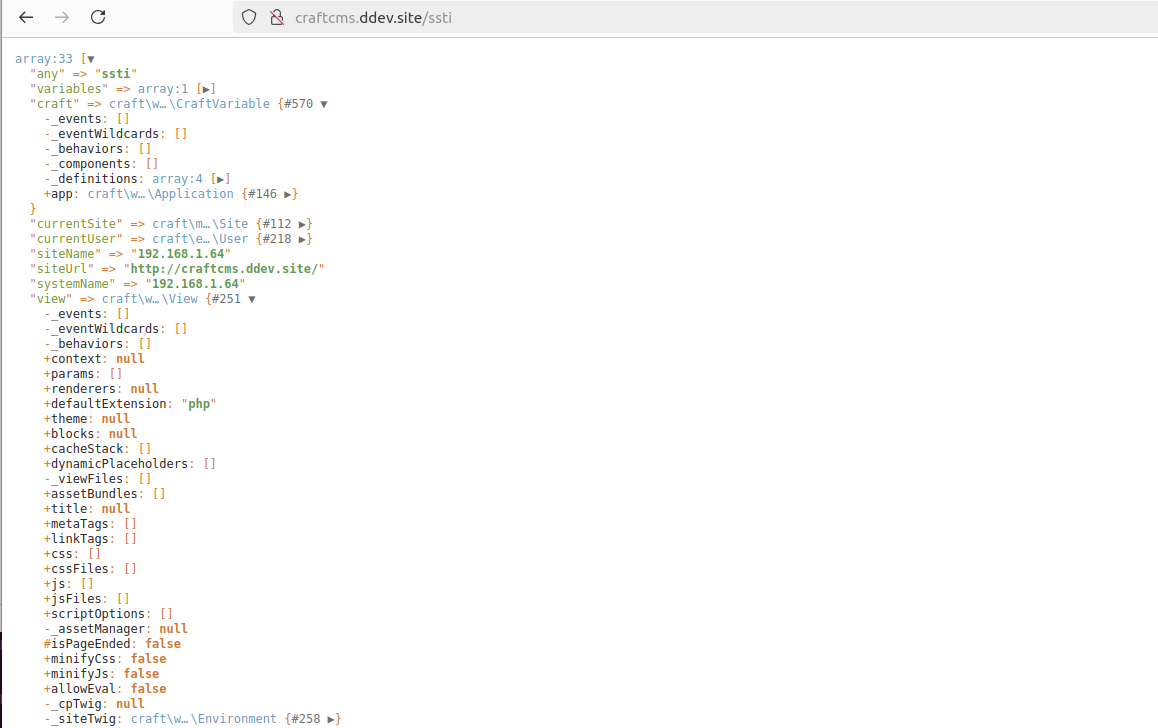
Impact
Attackers who compromise an admin account(The admin user is not equal to the server owner) can exploit this flaw to assign sensitive folders as the base path of the filesystem. For instance, if the path /templates is specified (e.g., file://file:////var/www/html/templates), the attacker could upload SSTI payloads. While CraftCMS includes strict SSTI input sanitization, RCE may still be possible if the attacker can craft a valid payload, as seen in similar vulnerabilities (e.g., GHSA-44wr-rmwq-3phw).
Additionally, attackers can upload tampered files to overwrite critical web application files. By enabling public URLs for files in the specified filesystem, they can also retrieve sensitive files (e.g., configuration files from the local file system).
Although the vulnerability is exploitable only in the authenticated users, configuration with ALLOW_ADMIN_CHANGES=true, there is still a potential security threat.
{
"affected": [
{
"database_specific": {
"last_known_affected_version_range": "\u003c= 5.4.5.1"
},
"package": {
"ecosystem": "Packagist",
"name": "craftcms/cms"
},
"ranges": [
{
"events": [
{
"introduced": "5.0.0-RC1"
},
{
"fixed": "5.4.6"
}
],
"type": "ECOSYSTEM"
}
]
},
{
"database_specific": {
"last_known_affected_version_range": "\u003c= 4.12.4.1"
},
"package": {
"ecosystem": "Packagist",
"name": "craftcms/cms"
},
"ranges": [
{
"events": [
{
"introduced": "4.0.0-RC1"
},
{
"fixed": "4.12.5"
}
],
"type": "ECOSYSTEM"
}
]
}
],
"aliases": [
"CVE-2024-52291"
],
"database_specific": {
"cwe_ids": [
"CWE-22"
],
"github_reviewed": true,
"github_reviewed_at": "2024-11-13T14:12:36Z",
"nvd_published_at": "2024-11-13T17:15:12Z",
"severity": "HIGH"
},
"details": "### Summary\nA vulnerability in CraftCMS allows an attacker to bypass local file system validation by utilizing a double `file://` scheme (e.g., `file://file:////`). This enables the attacker to specify sensitive folders as the file system, leading to potential file overwriting through malicious uploads, unauthorized access to sensitive files, and, under certain conditions, remote code execution (RCE) via Server-Side Template Injection (SSTI) payloads.\n\nNote that this will only work if you have an authenticated administrator account with [allowAdminChanges enabled](https://craftcms.com/docs/5.x/reference/config/general.html#allowadminchanges).\n\nhttps://craftcms.com/knowledge-base/securing-craft#set-allowAdminChanges-to-false-in-production\n\n### Details\nThe issue lies in line 57 of `cms/src/helpers/FileHelper.php`, it only removes `file://` on the most left. It is trivial to bypass this sanitization by adding 2 `file://`, e.g. `file://file:////`.\n```php\n public static function normalizePath($path, $ds = DIRECTORY_SEPARATOR): string\n {\n // Remove any file protocol wrappers\n $path = StringHelper::removeLeft($path, \u0027file://\u0027);\n\n // Is this a UNC network share path?\n $isUnc = (str_starts_with($path, \u0027//\u0027) || str_starts_with($path, \u0027\\\\\\\\\u0027));\n\n // Normalize the path\n $path = parent::normalizePath($path, $ds);\n\n // If it is UNC, add those slashes back in front\n if ($isUnc) {\n $path = $ds . $ds . ltrim($path, $ds);\n }\n\n return $path;\n }\n```\n\n### PoC\n1. Sign in with an admin account and navigate to `Settings \u2192 Assets`, then create a new volume.\n2. n the Asset Filesystem section, create a new file system and set the Base Path to `file://file:////vendor`.\nWithout the prefix, the selection fails.\n \nWith the double `file://` prefix, the selection succeeds.\n \n3. Access Assets from the left navigation bar, then upload a file into this volume.\n \n4. The file is successfully uploaded and stored in the sensitive folder specified (e.g., `/vendor`).\n \n5. SSTI payloads can be uploaded to `/templates` folder, though full code execution was not achieved during testing, some payloads were still successful, leading to sensitive information disclosure, among other potential impacts.\n \n\n### Impact\nAttackers who compromise an admin account(The admin user is not equal to the server owner) can exploit this flaw to assign sensitive folders as the base path of the filesystem. For instance, if the path `/templates` is specified (e.g., `file://file:////var/www/html/templates`), the attacker could upload SSTI payloads. While CraftCMS includes strict SSTI input sanitization, RCE may still be possible if the attacker can craft a valid payload, as seen in similar vulnerabilities (e.g., [GHSA-44wr-rmwq-3phw](https://github.com/advisories/GHSA-44wr-rmwq-3phw)).\n\nAdditionally, attackers can upload tampered files to overwrite critical web application files. By enabling public URLs for files in the specified filesystem, they can also retrieve sensitive files (e.g., configuration files from the local file system).\n\nAlthough the vulnerability is exploitable only in the authenticated users, configuration with `ALLOW_ADMIN_CHANGES=true`, there is still a potential security threat.\n\n",
"id": "GHSA-jrh5-vhr9-qh7q",
"modified": "2024-11-13T18:58:32Z",
"published": "2024-11-13T14:12:36Z",
"references": [
{
"type": "WEB",
"url": "https://github.com/craftcms/cms/security/advisories/GHSA-jrh5-vhr9-qh7q"
},
{
"type": "ADVISORY",
"url": "https://nvd.nist.gov/vuln/detail/CVE-2024-52291"
},
{
"type": "PACKAGE",
"url": "https://github.com/craftcms/cms"
}
],
"schema_version": "1.4.0",
"severity": [
{
"score": "CVSS:3.1/AV:N/AC:L/PR:H/UI:R/S:C/C:H/I:H/A:H",
"type": "CVSS_V3"
},
{
"score": "CVSS:4.0/AV:N/AC:L/AT:P/PR:H/UI:A/VC:H/VI:H/VA:H/SC:H/SI:H/SA:H/E:P",
"type": "CVSS_V4"
}
],
"summary": "Local File System Validation Bypass Leading to File Overwrite, Sensitive File Access, and Potential Code Execution"
}
GHSA-JRH8-99HV-M6MP
Vulnerability from github – Published: 2022-05-02 03:18 – Updated: 2022-05-02 03:18Directory traversal vulnerability in mapserv.c in mapserv in MapServer 4.x before 4.10.4 and 5.x before 5.2.2, when running on Windows with Cygwin, allows remote attackers to create arbitrary files via a .. (dot dot) in the id parameter.
{
  "affected": [],
  "aliases": [
    "CVE-2009-0841"
  ],
  "database_specific": {
    "cwe_ids": [
      "CWE-22"
    ],
    "github_reviewed": false,
    "github_reviewed_at": null,
    "nvd_published_at": "2009-03-31T18:24:00Z",
    "severity": "HIGH"
  },
  "details": "Directory traversal vulnerability in mapserv.c in mapserv in MapServer 4.x before 4.10.4 and 5.x before 5.2.2, when running on Windows with Cygwin, allows remote attackers to create arbitrary files via a .. (dot dot) in the id parameter.",
  "id": "GHSA-jrh8-99hv-m6mp",
  "modified": "2022-05-02T03:18:40Z",
  "published": "2022-05-02T03:18:40Z",
  "references": [
    {
      "type": "ADVISORY",
      "url": "https://nvd.nist.gov/vuln/detail/CVE-2009-0841"
    },
    {
      "type": "WEB",
      "url": "https://exchange.xforce.ibmcloud.com/vulnerabilities/49548"
    },
    {
      "type": "WEB",
      "url": "https://www.redhat.com/archives/fedora-package-announce/2009-April/msg00147.html"
    },
    {
      "type": "WEB",
      "url": "https://www.redhat.com/archives/fedora-package-announce/2009-April/msg00170.html"
    },
    {
      "type": "WEB",
      "url": "http://lists.osgeo.org/pipermail/mapserver-users/2009-March/060600.html"
    },
    {
      "type": "WEB",
      "url": "http://secunia.com/advisories/34520"
    },
    {
      "type": "WEB",
      "url": "http://secunia.com/advisories/34603"
    },
    {
      "type": "WEB",
      "url": "http://trac.osgeo.org/mapserver/ticket/2942"
    },
    {
      "type": "WEB",
      "url": "http://www.debian.org/security/2009/dsa-1914"
    },
    {
      "type": "WEB",
      "url": "http://www.positronsecurity.com/advisories/2009-000.html"
    },
    {
      "type": "WEB",
      "url": "http://www.securityfocus.com/archive/1/502271/100/0/threaded"
    },
    {
      "type": "WEB",
      "url": "http://www.securityfocus.com/bid/34306"
    },
    {
      "type": "WEB",
      "url": "http://www.securitytracker.com/id?1021952"
    }
  ],
  "schema_version": "1.4.0",
  "severity": []
}
GHSA-JRHF-HQRQ-C523
Vulnerability from github – Published: 2022-08-23 00:00 – Updated: 2022-08-24 00:00The Team WordPress plugin before 4.1.2 contains a file which could allow any authenticated users to download arbitrary files from the server via a path traversal vector. Furthermore, the file will also be deleted after its content is returned to the user
{
  "affected": [],
  "aliases": [
    "CVE-2022-2557"
  ],
  "database_specific": {
    "cwe_ids": [
      "CWE-22"
    ],
    "github_reviewed": false,
    "github_reviewed_at": null,
    "nvd_published_at": "2022-08-22T15:15:00Z",
    "severity": "HIGH"
  },
  "details": "The Team WordPress plugin before 4.1.2 contains a file which could allow any authenticated users to download arbitrary files from the server via a path traversal vector. Furthermore, the file will also be deleted after its content is returned to the user",
  "id": "GHSA-jrhf-hqrq-c523",
  "modified": "2022-08-24T00:00:28Z",
  "published": "2022-08-23T00:00:17Z",
  "references": [
    {
      "type": "ADVISORY",
      "url": "https://nvd.nist.gov/vuln/detail/CVE-2022-2557"
    },
    {
      "type": "WEB",
      "url": "https://wpscan.com/vulnerability/c043916a-92c9-4d02-8cca-1a90e5382b7e"
    }
  ],
  "schema_version": "1.4.0",
  "severity": [
    {
      "score": "CVSS:3.1/AV:N/AC:L/PR:L/UI:N/S:U/C:H/I:H/A:H",
      "type": "CVSS_V3"
    }
  ]
}
GHSA-JRHG-82W2-VVJ7
Vulnerability from github – Published: 2025-12-02 01:08 – Updated: 2025-12-02 01:08Impact
Attackers can delete any file on the server at will, causing damage or unavailability of server resources. Attackers can control the 'FileMd5' parameter to delete any file and folder
The affected code:
Affected interfaces: /api/fileUploadAndDownload/removeChunk
POC: You can specify the FileMd5 value as the directory or file you want to delete
```POST /api/fileUploadAndDownload/removeChunk HTTP/1.1 Host: 127.0.0.1:8080 Content-Length: 78 sec-ch-ua: "Not=A?Brand";v="99", "Chromium";v="118" x-token: eyJhbGciOiJIUzI1NiIsInR5cCI6IkpXVCJ9.eyJVVUlEIjoiOGYzYTdjMmMtYjAwMC00ODFmLWEyNGYtYzQyMDc2NTFjNWRmIiwiSUQiOjEsIlVzZXJuYW1lIjoiYWRtaW4iLCJOaWNrTmFtZSI6Ik1yLuWlh-a3vCIsIkF1dGhvcml0eUlkIjo4ODgsIkJ1ZmZlclRpbWUiOjg2NDAwLCJpc3MiOiJxbVBsdXMiLCJhdWQiOlsiR1ZBIl0sImV4cCI6MTc2MzIxNDQzMywibmJmIjoxNzYyNjA5NjMzfQ.7BTnRq65JDiPdlb0gJuAUa2nifIDTtePsnDnAtZoFJQ sec-ch-ua-mobile: ?0 User-Agent: Mozilla/5.0 (Windows NT 10.0; Win64; x64) AppleWebKit/537.36 (KHTML, like Gecko) Chrome/118.0.5993.90 Safari/537.36 Content-Type: application/json Accept: application/json, text/plain, / x-user-id: 1 sec-ch-ua-platform: "Windows" Origin: http://127.0.0.1:8080 Sec-Fetch-Site: same-origin Sec-Fetch-Mode: cors Sec-Fetch-Dest: empty Referer: http://127.0.0.1:8080/ Accept-Encoding: gzip, deflate, br Accept-Language: zh-CN,zh;q=0.9 Cookie: x-token=eyJhbGciOiJIUzI1NiIsInR5cCI6IkpXVCJ9.eyJVVUlEIjoiOGYzYTdjMmMtYjAwMC00ODFmLWEyNGYtYzQyMDc2NTFjNWRmIiwiSUQiOjEsIlVzZXJuYW1lIjoiYWRtaW4iLCJOaWNrTmFtZSI6Ik1yLuWlh-a3vCIsIkF1dGhvcml0eUlkIjo4ODgsIkJ1ZmZlclRpbWUiOjg2NDAwLCJpc3MiOiJxbVBsdXMiLCJhdWQiOlsiR1ZBIl0sImV4cCI6MTc2MzIxNDQzMywibmJmIjoxNzYyNjA5NjMzfQ.7BTnRq65JDiPdlb0gJuAUa2nifIDTtePsnDnAtZoFJQ Connection: close
{"fileName":"ceshi.jpg","fileMd5":"../config.yaml","filePath":"./fileDir/ceshi.jpg"}
```
Patches
Please wait for the latest patch
References
https://github.com/flipped-aurora/gin-vue-admin
{
"affected": [
{
"package": {
"ecosystem": "Go",
"name": "github.com/flipped-aurora/gin-vue-admin"
},
"ranges": [
{
"events": [
{
"introduced": "0"
},
{
"fixed": "0.9.1-0.20251201084432-ee8d8d7e04d9"
}
],
"type": "ECOSYSTEM"
}
]
}
],
"aliases": [
"CVE-2025-66410"
],
"database_specific": {
"cwe_ids": [
"CWE-22"
],
"github_reviewed": true,
"github_reviewed_at": "2025-12-02T01:08:48Z",
"nvd_published_at": "2025-12-01T23:15:53Z",
"severity": "HIGH"
},
"details": "### Impact\nAttackers can delete any file on the server at will, causing damage or unavailability of server resources. Attackers can control the \u0027FileMd5\u0027 parameter to delete any file and folder\n\n The affected code:\n\n\nAffected interfaces:\n/api/fileUploadAndDownload/removeChunk\n\n\nPOC:\nYou can specify the FileMd5 value as the directory or file you want to delete\n\n```POST /api/fileUploadAndDownload/removeChunk HTTP/1.1\nHost: 127.0.0.1:8080\nContent-Length: 78\nsec-ch-ua: \"Not=A?Brand\";v=\"99\", \"Chromium\";v=\"118\"\nx-token: eyJhbGciOiJIUzI1NiIsInR5cCI6IkpXVCJ9.eyJVVUlEIjoiOGYzYTdjMmMtYjAwMC00ODFmLWEyNGYtYzQyMDc2NTFjNWRmIiwiSUQiOjEsIlVzZXJuYW1lIjoiYWRtaW4iLCJOaWNrTmFtZSI6Ik1yLuWlh-a3vCIsIkF1dGhvcml0eUlkIjo4ODgsIkJ1ZmZlclRpbWUiOjg2NDAwLCJpc3MiOiJxbVBsdXMiLCJhdWQiOlsiR1ZBIl0sImV4cCI6MTc2MzIxNDQzMywibmJmIjoxNzYyNjA5NjMzfQ.7BTnRq65JDiPdlb0gJuAUa2nifIDTtePsnDnAtZoFJQ\nsec-ch-ua-mobile: ?0\nUser-Agent: Mozilla/5.0 (Windows NT 10.0; Win64; x64) AppleWebKit/537.36 (KHTML, like Gecko) Chrome/118.0.5993.90 Safari/537.36\nContent-Type: application/json\nAccept: application/json, text/plain, */*\nx-user-id: 1\nsec-ch-ua-platform: \"Windows\"\nOrigin: http://127.0.0.1:8080\nSec-Fetch-Site: same-origin\nSec-Fetch-Mode: cors\nSec-Fetch-Dest: empty\nReferer: http://127.0.0.1:8080/\nAccept-Encoding: gzip, deflate, br\nAccept-Language: zh-CN,zh;q=0.9\nCookie: x-token=eyJhbGciOiJIUzI1NiIsInR5cCI6IkpXVCJ9.eyJVVUlEIjoiOGYzYTdjMmMtYjAwMC00ODFmLWEyNGYtYzQyMDc2NTFjNWRmIiwiSUQiOjEsIlVzZXJuYW1lIjoiYWRtaW4iLCJOaWNrTmFtZSI6Ik1yLuWlh-a3vCIsIkF1dGhvcml0eUlkIjo4ODgsIkJ1ZmZlclRpbWUiOjg2NDAwLCJpc3MiOiJxbVBsdXMiLCJhdWQiOlsiR1ZBIl0sImV4cCI6MTc2MzIxNDQzMywibmJmIjoxNzYyNjA5NjMzfQ.7BTnRq65JDiPdlb0gJuAUa2nifIDTtePsnDnAtZoFJQ\nConnection: close\n\n{\"fileName\":\"ceshi.jpg\",\"fileMd5\":\"../config.yaml\",\"filePath\":\"./fileDir/ceshi.jpg\"}\n```\n\n\n### Patches\nPlease wait for the latest patch\n\n### References\nhttps://github.com/flipped-aurora/gin-vue-admin",
"id": "GHSA-jrhg-82w2-vvj7",
"modified": "2025-12-02T01:08:48Z",
"published": "2025-12-02T01:08:48Z",
"references": [
{
"type": "WEB",
"url": "https://github.com/flipped-aurora/gin-vue-admin/security/advisories/GHSA-jrhg-82w2-vvj7"
},
{
"type": "ADVISORY",
"url": "https://nvd.nist.gov/vuln/detail/CVE-2025-66410"
},
{
"type": "WEB",
"url": "https://github.com/flipped-aurora/gin-vue-admin/commit/ee8d8d7e04d9c38a35a6969f20e75213e84f57c6"
},
{
"type": "PACKAGE",
"url": "https://github.com/flipped-aurora/gin-vue-admin"
}
],
"schema_version": "1.4.0",
"severity": [
{
"score": "CVSS:4.0/AV:N/AC:L/AT:N/PR:N/UI:N/VC:N/VI:H/VA:N/SC:N/SI:N/SA:N",
"type": "CVSS_V4"
}
],
"summary": "Gin-vue-admin has an arbitrary file deletion vulnerability"
}
GHSA-JRHM-GH44-XJ4M
Vulnerability from github – Published: 2025-07-02 09:30 – Updated: 2025-07-02 15:30Sending a crafted SOAP "provision" operation message PlanId field within the Mobile Network Operator (MNO) internal Radio Access Network (RAN) management network can cause path traversal issue in Nokia Single RAN baseband software with versions earlier than release 24R1-SR 1.0 MP. This issue has been corrected to release 24R1-SR 1.0 MP and later.
Beginning with release 24R1-SR 1.0 MP, the OAM service software performed PlanId field input validations mitigate the reported path traversal issue.
{
  "affected": [],
  "aliases": [
    "CVE-2025-24330"
  ],
  "database_specific": {
    "cwe_ids": [
      "CWE-22"
    ],
    "github_reviewed": false,
    "github_reviewed_at": null,
    "nvd_published_at": "2025-07-02T09:15:24Z",
    "severity": "MODERATE"
  },
  "details": "Sending a crafted SOAP \"provision\" operation message PlanId field within the Mobile Network Operator (MNO) internal Radio Access Network (RAN) management network can cause path traversal issue in Nokia Single RAN baseband software with versions earlier than release 24R1-SR 1.0 MP. This issue has been corrected to release 24R1-SR 1.0 MP and later.\n\nBeginning with release 24R1-SR 1.0 MP, the OAM service software performed PlanId field input validations mitigate the reported path traversal issue.",
  "id": "GHSA-jrhm-gh44-xj4m",
  "modified": "2025-07-02T15:30:36Z",
  "published": "2025-07-02T09:30:29Z",
  "references": [
    {
      "type": "ADVISORY",
      "url": "https://nvd.nist.gov/vuln/detail/CVE-2025-24330"
    },
    {
      "type": "WEB",
      "url": "https://www.nokia.com/about-us/security-and-privacy/product-security-advisory/cve-2025-24330"
    }
  ],
  "schema_version": "1.4.0",
  "severity": [
    {
      "score": "CVSS:3.1/AV:A/AC:H/PR:H/UI:N/S:U/C:H/I:H/A:H",
      "type": "CVSS_V3"
    }
  ]
}
GHSA-JRP8-RCJ4-QWJ2
Vulnerability from github – Published: 2022-04-27 00:00 – Updated: 2022-05-05 00:00Verydows v2.0 was discovered to contain an arbitrary file deletion vulnerability via \backend\database_controller.php.
{
  "affected": [],
  "aliases": [
    "CVE-2022-28059"
  ],
  "database_specific": {
    "cwe_ids": [
      "CWE-22"
    ],
    "github_reviewed": false,
    "github_reviewed_at": null,
    "nvd_published_at": "2022-04-26T21:15:00Z",
    "severity": "HIGH"
  },
  "details": "Verydows v2.0 was discovered to contain an arbitrary file deletion vulnerability via \\backend\\database_controller.php.",
  "id": "GHSA-jrp8-rcj4-qwj2",
  "modified": "2022-05-05T00:00:36Z",
  "published": "2022-04-27T00:00:19Z",
  "references": [
    {
      "type": "ADVISORY",
      "url": "https://nvd.nist.gov/vuln/detail/CVE-2022-28059"
    },
    {
      "type": "WEB",
      "url": "https://github.com/Verytops/verydows/issues/21"
    },
    {
      "type": "WEB",
      "url": "https://github.com/zhendezuile/bug_report/blob/main/bug_d"
    }
  ],
  "schema_version": "1.4.0",
  "severity": [
    {
      "score": "CVSS:3.1/AV:N/AC:L/PR:L/UI:N/S:U/C:N/I:H/A:H",
      "type": "CVSS_V3"
    }
  ]
}
GHSA-JRP8-VQ3H-W34W
Vulnerability from github – Published: 2025-02-07 18:31 – Updated: 2025-02-10 18:30Directory Traversal vulnerability in dhtmlxFileExplorer v.8.4.6 allows a remote attacker to obtain sensitive information via the File Listing function.
{
  "affected": [],
  "aliases": [
    "CVE-2024-55213"
  ],
  "database_specific": {
    "cwe_ids": [
      "CWE-22",
      "CWE-552"
    ],
    "github_reviewed": false,
    "github_reviewed_at": null,
    "nvd_published_at": "2025-02-07T16:15:37Z",
    "severity": "HIGH"
  },
  "details": "Directory Traversal vulnerability in dhtmlxFileExplorer v.8.4.6 allows a remote attacker to obtain sensitive information via the File Listing function.",
  "id": "GHSA-jrp8-vq3h-w34w",
  "modified": "2025-02-10T18:30:46Z",
  "published": "2025-02-07T18:31:21Z",
  "references": [
    {
      "type": "ADVISORY",
      "url": "https://nvd.nist.gov/vuln/detail/CVE-2024-55213"
    },
    {
      "type": "WEB",
      "url": "https://dhtmlx.com/docs/products/demoApps/dhtmlxFileExplorerDemo"
    },
    {
      "type": "WEB",
      "url": "https://packetstorm.news/files/id/189020"
    }
  ],
  "schema_version": "1.4.0",
  "severity": [
    {
      "score": "CVSS:3.1/AV:L/AC:L/PR:N/UI:N/S:U/C:H/I:H/A:L",
      "type": "CVSS_V3"
    }
  ]
}
GHSA-JRPM-FX68-C8J4
Vulnerability from github – Published: 2026-10-20 15:31 – Updated: 2026-10-20 15:31A security flaw has been discovered in DrayTek Vigor2960 1.5.1.6 Revision 8218. The affected element is the function cgiEscape of the file /cgi-bin/mainfunction.cgi of the component swmconfigupload. The manipulation of the argument multipart results in path traversal. It is possible to launch the attack remotely. The exploit has been released to the public and may be used for attacks. Upgrading to version 1.5.1.7 is sufficient to fix this issue. The affected component should be upgraded. The vendor explains: "2960 1.5.1.7 has corrected many security issues. And 2960 is EoS with limited support, only major issues would be reviewed(e.g. unauthenticated vuln.)". This vulnerability only affects products that are no longer supported by the maintainer.
{
  "affected": [],
  "aliases": [
    "CVE-2026-113395"
  ],
  "database_specific": {
    "cwe_ids": [
      "CWE-22"
    ],
    "github_reviewed": false,
    "github_reviewed_at": null,
    "nvd_published_at": "2026-10-20T14:16:59Z",
    "severity": "LOW"
  },
  "details": "A security flaw has been discovered in DrayTek Vigor2960 1.5.1.6 Revision 8218. The affected element is the function cgiEscape of the file /cgi-bin/mainfunction.cgi of the component swmconfigupload. The manipulation of the argument multipart results in path traversal. It is possible to launch the attack remotely. The exploit has been released to the public and may be used for attacks. Upgrading to version 1.5.1.7 is sufficient to fix this issue. The affected component should be upgraded. The vendor explains: \"2960 1.5.1.7 has corrected many security issues. And 2960 is EoS with limited support, only major issues would be reviewed(e.g. unauthenticated vuln.)\". This vulnerability only affects products that are no longer supported by the maintainer.",
  "id": "GHSA-jrpm-fx68-c8j4",
  "modified": "2026-10-20T15:31:24Z",
  "published": "2026-10-20T15:31:24Z",
  "references": [
    {
      "type": "ADVISORY",
      "url": "https://nvd.nist.gov/vuln/detail/CVE-2026-113395"
    },
    {
      "type": "WEB",
      "url": "https://fw.draytek.com.tw/Vigor2960/Firmware/v1.5.1.7/Vigor2960_v1.5.1.7.zip"
    },
    {
      "type": "WEB",
      "url": "https://github.com/yikesoftware/DrayTek_Vigor2960_Security_Analysis/tree/main/cases/DRV2960-0012-authenticated-swmconfigupload-fieldname-path-traversal-clobber"
    },
    {
      "type": "WEB",
      "url": "https://vuldb.com/cve/CVE-2026-113395"
    },
    {
      "type": "WEB",
      "url": "https://vuldb.com/submit/992248"
    },
    {
      "type": "WEB",
      "url": "https://vuldb.com/vuln/422671"
    },
    {
      "type": "WEB",
      "url": "https://vuldb.com/vuln/422671/cti"
    }
  ],
  "schema_version": "1.4.0",
  "severity": [
    {
      "score": "CVSS:3.1/AV:N/AC:L/PR:L/UI:N/S:C/C:L/I:L/A:L",
      "type": "CVSS_V3"
    },
    {
      "score": "CVSS:4.0/AV:N/AC:L/AT:N/PR:L/UI:N/VC:L/VI:L/VA:L/SC:L/SI:L/SA:L/E:P/CR:X/IR:X/AR:X/MAV:X/MAC:X/MAT:X/MPR:X/MUI:X/MVC:X/MVI:X/MVA:X/MSC:X/MSI:X/MSA:X/S:X/AU:X/R:X/V:X/RE:X/U:X",
      "type": "CVSS_V4"
    }
  ]
}
GHSA-JRQ7-XRJX-PCFW
Vulnerability from github – Published: 2026-10-15 20:10 – Updated: 2026-10-15 20:10Summary
Nginx UI validates backup_path and storage_path against the administrator-defined backup.GrantedAccessPath boundary, but the final auto-backup output filename is built from the user-controlled auto-backup name without stripping path separators or .. components.
An authenticated user who can create or modify an auto-backup task can set a name such as task/../../../escaped. The configured storage_path still passes validation because it is inside GrantedAccessPath, but the generated backup path escapes that storage directory when filepath.Join(storage_path, filename) resolves the embedded traversal sequence.
This bypasses the documented backup path boundary and allows backup archives, and for encrypted configuration backups the adjacent .key file, to be written outside the intended storage directory with the Nginx UI process privileges.
Affected Versions
- Current
devbranch commit checked:4948fba8744e82c3d7003f68ee164e9f49421066 - Latest release checked:
v2.3.10, published 2026-04-28 - The vulnerable filename construction is present in both current
devandv2.3.10.
Security Boundary
The project documentation describes backup.GrantedAccessPath as the critical security boundary for backup operations. It says the setting:
- restricts backup operations to explicitly authorized directories,
- prevents unauthorized access to sensitive system directories,
- enforces administrator-defined boundaries,
- normalizes paths to prevent traversal attempts.
That boundary is enforced for the configured storage_path, but not for the final path after the backup name is appended.
Root Cause
model.AutoBackup.GetName() only trims whitespace and replaces spaces:
func (a *AutoBackup) GetName() string {
    return strings.ReplaceAll(strings.TrimSpace(a.Name), " ", "_")
}
The result is then embedded directly into filenames:
filename := fmt.Sprintf("%s_%d.zip", autoBackup.GetName(), time.Now().Unix())
outputPath = filepath.Join(autoBackup.StoragePath, filename)
and for custom directory backups:
filename := fmt.Sprintf("custom_dir_%s_%d.zip", autoBackup.GetName(), time.Now().Unix())
outputPath = filepath.Join(autoBackup.StoragePath, filename)
The API validation rules require name, backup_type, storage_type, storage_path, and cron_expression, but do not reject /, \, or .. in name. ValidateAutoBackupConfig validates backup_path and storage_path, but it does not validate the final outputPath after appending the generated filename.
Relevant paths:
model/auto_backup.goapi/backup/auto_backup.gointernal/backup/auto_backup.gointernal/backup/utils.go
Proof of Concept
The following local-only reproducer mirrors the relevant code path without contacting any external system:
name := "task/../../../escaped"
filename := fmt.Sprintf("custom_dir_%s_%d.zip", getName(name), int64(1715555555))
outputPath := filepath.Join(storageDir, filename)
Setup:
- Create a temporary
granteddirectory. - Set
sourceDirandstorageDirunder that granted directory. - Treat only
grantedas the allowed path boundary. - Use the auto-backup name
task/../../../escaped. - Create the custom-directory backup using the same filename pattern and zip creation behavior.
Observed output:
granted_root=/Users/jagadeshachanta/.cache/tmp/nginx-ui-autobackup-poc-1538710430/granted
validated_storage_path=/Users/jagadeshachanta/.cache/tmp/nginx-ui-autobackup-poc-1538710430/granted/storage
auto_backup_name="task/../../../escaped"
constructed_filename="custom_dir_task/../../../escaped_1715555555.zip"
created_file=/Users/jagadeshachanta/.cache/tmp/nginx-ui-autobackup-poc-1538710430/escaped_1715555555.zip
escaped_validated_storage_path=true
created_file_exists=true
The configured storage path is inside the granted directory, but the created backup file is outside both the storage directory and the granted directory.
A repo-local regression test was also prepared at:
internal/backup/auto_backup_path_traversal_poc_test.go
The test cannot currently be executed cleanly in this checkout because unrelated build prerequisites fail before the package test runs:
app/app.go: pattern all:dist: no matching files found
model/cert.go: no required module provides package github.com/go-acme/lego/v5/certificate
internal/helper/key_type.go: no required module provides package github.com/go-acme/lego/v5/certcrypto
The standalone reproducer output above was therefore used as the executable proof for this report.
Impact
An authenticated user with access to the auto-backup API can bypass the administrator-configured backup storage boundary. Depending on filesystem permissions and deployment layout, this can:
- write backup archives outside the intended
storage_path, - write encrypted configuration backup key files outside the intended
storage_path, - place sensitive backup material in directories that administrators did not authorize for backup storage,
- create or overwrite timestamp-suffixed files outside the validated backup directory using the Nginx UI process privileges.
This is especially relevant because backup archives may contain Nginx UI configuration, database files, Nginx configuration, and for encrypted config backups the adjacent key file required to decrypt the archive.
Suggested Fix
Recommended defense in depth:
- Treat auto-backup
nameas a display label only, not as a filesystem path component. - Sanitize generated filenames with
filepath.Baseor a strict allowlist such as[A-Za-z0-9._-]. - Reject path separators, drive separators, NUL bytes, and
..segments inname. - After constructing
outputPath, clean it and validate that the final path remains inside the already-validatedstorage_path. - Add regression tests for both local and S3 temporary-file paths.
Example invariant:
cleanOutput := filepath.Clean(outputPath)
cleanStorage := filepath.Clean(autoBackup.StoragePath) + string(filepath.Separator)
if !strings.HasPrefix(cleanOutput, cleanStorage) {
    return ErrPathNotInGrantedAccess
}
Disclosure Notes
This was tested only in a local isolated environment against source code and temporary directories. No online demo systems or production systems were tested.
AI assistance was used to inspect the open-source code, prepare the local reproducer, and draft this report. The issue and PoC output were verified locally before submission.
{
  "affected": [
    {
      "package": {
        "ecosystem": "Go",
        "name": "github.com/0xJacky/Nginx-UI"
      },
      "ranges": [
        {
          "events": [
            {
              "introduced": "0"
            },
            {
              "fixed": "1.9.10-0.20260715121709-f92218e01054"
            }
          ],
          "type": "ECOSYSTEM"
        }
      ]
    }
  ],
  "aliases": [
    "CVE-2026-84320"
  ],
  "database_specific": {
    "cwe_ids": [
      "CWE-22"
    ],
    "github_reviewed": true,
    "github_reviewed_at": "2026-10-15T20:10:56Z",
    "nvd_published_at": "2026-10-12T21:17:22Z",
    "severity": "MODERATE"
  },
  "details": "## Summary\n\nNginx UI validates `backup_path` and `storage_path` against the administrator-defined `backup.GrantedAccessPath` boundary, but the final auto-backup output filename is built from the user-controlled auto-backup `name` without stripping path separators or `..` components.\n\nAn authenticated user who can create or modify an auto-backup task can set a name such as `task/../../../escaped`. The configured `storage_path` still passes validation because it is inside `GrantedAccessPath`, but the generated backup path escapes that storage directory when `filepath.Join(storage_path, filename)` resolves the embedded traversal sequence.\n\nThis bypasses the documented backup path boundary and allows backup archives, and for encrypted configuration backups the adjacent `.key` file, to be written outside the intended storage directory with the Nginx UI process privileges.\n\n## Affected Versions\n\n- Current `dev` branch commit checked: `4948fba8744e82c3d7003f68ee164e9f49421066`\n- Latest release checked: `v2.3.10`, published 2026-04-28\n- The vulnerable filename construction is present in both current `dev` and `v2.3.10`.\n\n## Security Boundary\n\nThe project documentation describes `backup.GrantedAccessPath` as the critical security boundary for backup operations. It says the setting:\n\n- restricts backup operations to explicitly authorized directories,\n- prevents unauthorized access to sensitive system directories,\n- enforces administrator-defined boundaries,\n- normalizes paths to prevent traversal attempts.\n\nThat boundary is enforced for the configured `storage_path`, but not for the final path after the backup name is appended.\n\n## Root Cause\n\n`model.AutoBackup.GetName()` only trims whitespace and replaces spaces:\n\n```go\nfunc (a *AutoBackup) GetName() string {\n    return strings.ReplaceAll(strings.TrimSpace(a.Name), \" \", \"_\")\n}\n```\n\nThe result is then embedded directly into filenames:\n\n```go\nfilename := fmt.Sprintf(\"%s_%d.zip\", autoBackup.GetName(), time.Now().Unix())\noutputPath = filepath.Join(autoBackup.StoragePath, filename)\n```\n\nand for custom directory backups:\n\n```go\nfilename := fmt.Sprintf(\"custom_dir_%s_%d.zip\", autoBackup.GetName(), time.Now().Unix())\noutputPath = filepath.Join(autoBackup.StoragePath, filename)\n```\n\nThe API validation rules require `name`, `backup_type`, `storage_type`, `storage_path`, and `cron_expression`, but do not reject `/`, `\\`, or `..` in `name`. `ValidateAutoBackupConfig` validates `backup_path` and `storage_path`, but it does not validate the final `outputPath` after appending the generated filename.\n\nRelevant paths:\n\n- `model/auto_backup.go`\n- `api/backup/auto_backup.go`\n- `internal/backup/auto_backup.go`\n- `internal/backup/utils.go`\n\n## Proof of Concept\n\nThe following local-only reproducer mirrors the relevant code path without contacting any external system:\n\n```go\nname := \"task/../../../escaped\"\nfilename := fmt.Sprintf(\"custom_dir_%s_%d.zip\", getName(name), int64(1715555555))\noutputPath := filepath.Join(storageDir, filename)\n```\n\nSetup:\n\n1. Create a temporary `granted` directory.\n2. Set `sourceDir` and `storageDir` under that granted directory.\n3. Treat only `granted` as the allowed path boundary.\n4. Use the auto-backup name `task/../../../escaped`.\n5. Create the custom-directory backup using the same filename pattern and zip creation behavior.\n\nObserved output:\n\n```text\ngranted_root=/Users/jagadeshachanta/.cache/tmp/nginx-ui-autobackup-poc-1538710430/granted\nvalidated_storage_path=/Users/jagadeshachanta/.cache/tmp/nginx-ui-autobackup-poc-1538710430/granted/storage\nauto_backup_name=\"task/../../../escaped\"\nconstructed_filename=\"custom_dir_task/../../../escaped_1715555555.zip\"\ncreated_file=/Users/jagadeshachanta/.cache/tmp/nginx-ui-autobackup-poc-1538710430/escaped_1715555555.zip\nescaped_validated_storage_path=true\ncreated_file_exists=true\n```\n\nThe configured storage path is inside the granted directory, but the created backup file is outside both the storage directory and the granted directory.\n\nA repo-local regression test was also prepared at:\n\n```text\ninternal/backup/auto_backup_path_traversal_poc_test.go\n```\n\nThe test cannot currently be executed cleanly in this checkout because unrelated build prerequisites fail before the package test runs:\n\n```text\napp/app.go: pattern all:dist: no matching files found\nmodel/cert.go: no required module provides package github.com/go-acme/lego/v5/certificate\ninternal/helper/key_type.go: no required module provides package github.com/go-acme/lego/v5/certcrypto\n```\n\nThe standalone reproducer output above was therefore used as the executable proof for this report.\n\n## Impact\n\nAn authenticated user with access to the auto-backup API can bypass the administrator-configured backup storage boundary. Depending on filesystem permissions and deployment layout, this can:\n\n- write backup archives outside the intended `storage_path`,\n- write encrypted configuration backup key files outside the intended `storage_path`,\n- place sensitive backup material in directories that administrators did not authorize for backup storage,\n- create or overwrite timestamp-suffixed files outside the validated backup directory using the Nginx UI process privileges.\n\nThis is especially relevant because backup archives may contain Nginx UI configuration, database files, Nginx configuration, and for encrypted config backups the adjacent key file required to decrypt the archive.\n\n## Suggested Fix\n\nRecommended defense in depth:\n\n1. Treat auto-backup `name` as a display label only, not as a filesystem path component.\n2. Sanitize generated filenames with `filepath.Base` or a strict allowlist such as `[A-Za-z0-9._-]`.\n3. Reject path separators, drive separators, NUL bytes, and `..` segments in `name`.\n4. After constructing `outputPath`, clean it and validate that the final path remains inside the already-validated `storage_path`.\n5. Add regression tests for both local and S3 temporary-file paths.\n\nExample invariant:\n\n```go\ncleanOutput := filepath.Clean(outputPath)\ncleanStorage := filepath.Clean(autoBackup.StoragePath) + string(filepath.Separator)\nif !strings.HasPrefix(cleanOutput, cleanStorage) {\n    return ErrPathNotInGrantedAccess\n}\n```\n\n## Disclosure Notes\n\nThis was tested only in a local isolated environment against source code and temporary directories. No online demo systems or production systems were tested.\n\nAI assistance was used to inspect the open-source code, prepare the local reproducer, and draft this report. The issue and PoC output were verified locally before submission.",
  "id": "GHSA-jrq7-xrjx-pcfw",
  "modified": "2026-10-15T20:10:56Z",
  "published": "2026-10-15T20:10:56Z",
  "references": [
    {
      "type": "WEB",
      "url": "https://github.com/0xJacky/nginx-ui/security/advisories/GHSA-jrq7-xrjx-pcfw"
    },
    {
      "type": "ADVISORY",
      "url": "https://nvd.nist.gov/vuln/detail/CVE-2026-84320"
    },
    {
      "type": "WEB",
      "url": "https://github.com/0xJacky/nginx-ui/commit/f92218e01054491fc1e6684dc6f7facaf8ab41eb"
    },
    {
      "type": "PACKAGE",
      "url": "https://github.com/0xJacky/nginx-ui"
    },
    {
      "type": "WEB",
      "url": "https://github.com/0xJacky/nginx-ui/releases/tag/v2.4.3"
    }
  ],
  "schema_version": "1.4.0",
  "severity": [
    {
      "score": "CVSS:3.1/AV:N/AC:L/PR:L/UI:N/S:U/C:L/I:L/A:L",
      "type": "CVSS_V3"
    }
  ],
  "summary": "Nginx UI: Auto backup name allows path traversal outside validated storage path"
}
Mitigation MIT-5.1
Strategy: Input Validation
- Assume all input is malicious. Use an "accept known good" input validation strategy, i.e., use a list of acceptable inputs that strictly conform to specifications. Reject any input that does not strictly conform to specifications, or transform it into something that does.
- When performing input validation, consider all potentially relevant properties, including length, type of input, the full range of acceptable values, missing or extra inputs, syntax, consistency across related fields, and conformance to business rules. As an example of business rule logic, "boat" may be syntactically valid because it only contains alphanumeric characters, but it is not valid if the input is only expected to contain colors such as "red" or "blue."
- Do not rely exclusively on looking for malicious or malformed inputs. This is likely to miss at least one undesirable input, especially if the code's environment changes. This can give attackers enough room to bypass the intended validation. However, denylists can be useful for detecting potential attacks or determining which inputs are so malformed that they should be rejected outright.
- When validating filenames, use stringent allowlists that limit the character set to be used. If feasible, only allow a single "." character in the filename to avoid weaknesses such as CWE-23, and exclude directory separators such as "/" to avoid CWE-36. Use a list of allowable file extensions, which will help to avoid CWE-434.
- Do not rely exclusively on a filtering mechanism that removes potentially dangerous characters. This is equivalent to a denylist, which may be incomplete (CWE-184). For example, filtering "/" is insufficient protection if the filesystem also supports the use of "\" as a directory separator. Another possible error could occur when the filtering is applied in a way that still produces dangerous data (CWE-182). For example, if "../" sequences are removed from the ".../...//" string in a sequential fashion, two instances of "../" would be removed from the original string, but the remaining characters would still form the "../" string.
Mitigation MIT-15
For any security checks that are performed on the client side, ensure that these checks are duplicated on the server side, in order to avoid CWE-602. Attackers can bypass the client-side checks by modifying values after the checks have been performed, or by changing the client to remove the client-side checks entirely. Then, these modified values would be submitted to the server.
Mitigation MIT-20.1
Strategy: Input Validation
- Inputs should be decoded and canonicalized to the application's current internal representation before being validated (CWE-180). Make sure that the application does not decode the same input twice (CWE-174). Such errors could be used to bypass allowlist validation schemes by introducing dangerous inputs after they have been checked.
- Use a built-in path canonicalization function (such as realpath() in C) that produces the canonical version of the pathname, which effectively removes ".." sequences and symbolic links (CWE-23, CWE-59). This includes:
- realpath() in C
- getCanonicalPath() in Java
- GetFullPath() in ASP.NET
- realpath() or abs_path() in Perl
- realpath() in PHP
Mitigation MIT-4
Strategy: Libraries or Frameworks
Use a vetted library or framework that does not allow this weakness to occur or provides constructs that make this weakness easier to avoid [REF-1482].
Mitigation MIT-29
Strategy: Firewall
Use an application firewall that can detect attacks against this weakness. It can be beneficial in cases in which the code cannot be fixed (because it is controlled by a third party), as an emergency prevention measure while more comprehensive software assurance measures are applied, or to provide defense in depth [REF-1481].
Mitigation MIT-17
Strategy: Environment Hardening
Run your code using the lowest privileges that are required to accomplish the necessary tasks [REF-76]. If possible, create isolated accounts with limited privileges that are only used for a single task. That way, a successful attack will not immediately give the attacker access to the rest of the software or its environment. For example, database applications rarely need to run as the database administrator, especially in day-to-day operations.
Mitigation MIT-21.1
Strategy: Enforcement by Conversion
- When the set of acceptable objects, such as filenames or URLs, is limited or known, create a mapping from a set of fixed input values (such as numeric IDs) to the actual filenames or URLs, and reject all other inputs.
- For example, ID 1 could map to "inbox.txt" and ID 2 could map to "profile.txt". Features such as the ESAPI AccessReferenceMap [REF-185] provide this capability.
Mitigation MIT-22
Strategy: Sandbox or Jail
- Run the code in a "jail" or similar sandbox environment that enforces strict boundaries between the process and the operating system. This may effectively restrict which files can be accessed in a particular directory or which commands can be executed by the software.
- OS-level examples include the Unix chroot jail, AppArmor, and SELinux. In general, managed code may provide some protection. For example, java.io.FilePermission in the Java SecurityManager allows the software to specify restrictions on file operations.
- This may not be a feasible solution, and it only limits the impact to the operating system; the rest of the application may still be subject to compromise.
- Be careful to avoid CWE-243 and other weaknesses related to jails.
Mitigation MIT-34
Strategy: Attack Surface Reduction
- Store library, include, and utility files outside of the web document root, if possible. Otherwise, store them in a separate directory and use the web server's access control capabilities to prevent attackers from directly requesting them. One common practice is to define a fixed constant in each calling program, then check for the existence of the constant in the library/include file; if the constant does not exist, then the file was directly requested, and it can exit immediately.
- This significantly reduces the chance of an attacker being able to bypass any protection mechanisms that are in the base program but not in the include files. It will also reduce the attack surface.
Mitigation MIT-39
- Ensure that error messages only contain minimal details that are useful to the intended audience and no one else. The messages need to strike the balance between being too cryptic (which can confuse users) or being too detailed (which may reveal more than intended). The messages should not reveal the methods that were used to determine the error. Attackers can use detailed information to refine or optimize their original attack, thereby increasing their chances of success.
- If errors must be captured in some detail, record them in log messages, but consider what could occur if the log messages can be viewed by attackers. Highly sensitive information such as passwords should never be saved to log files.
- Avoid inconsistent messaging that might accidentally tip off an attacker about internal state, such as whether a user account exists or not.
- In the context of path traversal, error messages which disclose path information can help attackers craft the appropriate attack strings to move through the file system hierarchy.
Mitigation MIT-16
Strategy: Environment Hardening
When using PHP, configure the application so that it does not use register_globals. During implementation, develop the application so that it does not rely on this feature, but be wary of implementing a register_globals emulation that is subject to weaknesses such as CWE-95, CWE-621, and similar issues.
CAPEC-126: Path Traversal
An adversary uses path manipulation methods to exploit insufficient input validation of a target to obtain access to data that should be not be retrievable by ordinary well-formed requests. A typical variety of this attack involves specifying a path to a desired file together with dot-dot-slash characters, resulting in the file access API or function traversing out of the intended directory structure and into the root file system. By replacing or modifying the expected path information the access function or API retrieves the file desired by the attacker. These attacks either involve the attacker providing a complete path to a targeted file or using control characters (e.g. path separators (/ or \) and/or dots (.)) to reach desired directories or files.
CAPEC-64: Using Slashes and URL Encoding Combined to Bypass Validation Logic
This attack targets the encoding of the URL combined with the encoding of the slash characters. An attacker can take advantage of the multiple ways of encoding a URL and abuse the interpretation of the URL. A URL may contain special character that need special syntax handling in order to be interpreted. Special characters are represented using a percentage character followed by two digits representing the octet code of the original character (%HEX-CODE). For instance US-ASCII space character would be represented with %20. This is often referred as escaped ending or percent-encoding. Since the server decodes the URL from the requests, it may restrict the access to some URL paths by validating and filtering out the URL requests it received. An attacker will try to craft an URL with a sequence of special characters which once interpreted by the server will be equivalent to a forbidden URL. It can be difficult to protect against this attack since the URL can contain other format of encoding such as UTF-8 encoding, Unicode-encoding, etc.
CAPEC-76: Manipulating Web Input to File System Calls
An attacker manipulates inputs to the target software which the target software passes to file system calls in the OS. The goal is to gain access to, and perhaps modify, areas of the file system that the target software did not intend to be accessible.
CAPEC-78: Using Escaped Slashes in Alternate Encoding
This attack targets the use of the backslash in alternate encoding. An adversary can provide a backslash as a leading character and causes a parser to believe that the next character is special. This is called an escape. By using that trick, the adversary tries to exploit alternate ways to encode the same character which leads to filter problems and opens avenues to attack.
CAPEC-79: Using Slashes in Alternate Encoding
This attack targets the encoding of the Slash characters. An adversary would try to exploit common filtering problems related to the use of the slashes characters to gain access to resources on the target host. Directory-driven systems, such as file systems and databases, typically use the slash character to indicate traversal between directories or other container components. For murky historical reasons, PCs (and, as a result, Microsoft OSs) choose to use a backslash, whereas the UNIX world typically makes use of the forward slash. The schizophrenic result is that many MS-based systems are required to understand both forms of the slash. This gives the adversary many opportunities to discover and abuse a number of common filtering problems. The goal of this pattern is to discover server software that only applies filters to one version, but not the other.